Draw Diagrams Using Agent Skills
Automate architecture, workflow, and system design diagrams using agent skills. Enable your AI agent to generate consistent, high-quality technical visuals directly from prompts, reducing manual effort and improving documentation speed.
Automate architecture diagrams, flow diagrams, sequence diagrams, and ER diagrams using agent skills.
When working as a software engineer, we often need diagrams to explain how a project works. Instead of drawing every diagram manually, we can use agent skills to generate editable diagram files from prompts.
In this article, we will use different diagram skills and different visual styles. This avoids making every diagram look like the same sketch-style diagram.
For the examples below, I used this open-source repository: https://github.com/codewalnut-labs/documenso
How to Install Diagram Skills
Visit https://www.skills.sh/, type the skill name, open the skill page, and run the install command in the terminal.
Let's generate different types of diagrams using these skills.
Diagram Type 1: Architecture Diagram
Architecture diagrams help explain the high-level structure of a project.
Use this when you want to show:
- Frontend
- Backend/API
- Database
- Authentication
- File storage
- External services
- Main system modules
Prompt
Steps
- Open the project in your AI coding agent.
- Run the prompt above.
- Let the agent analyze the repository.
- Open docs/architecture.excalidraw.
- Review the diagram.
Architecture Diagram
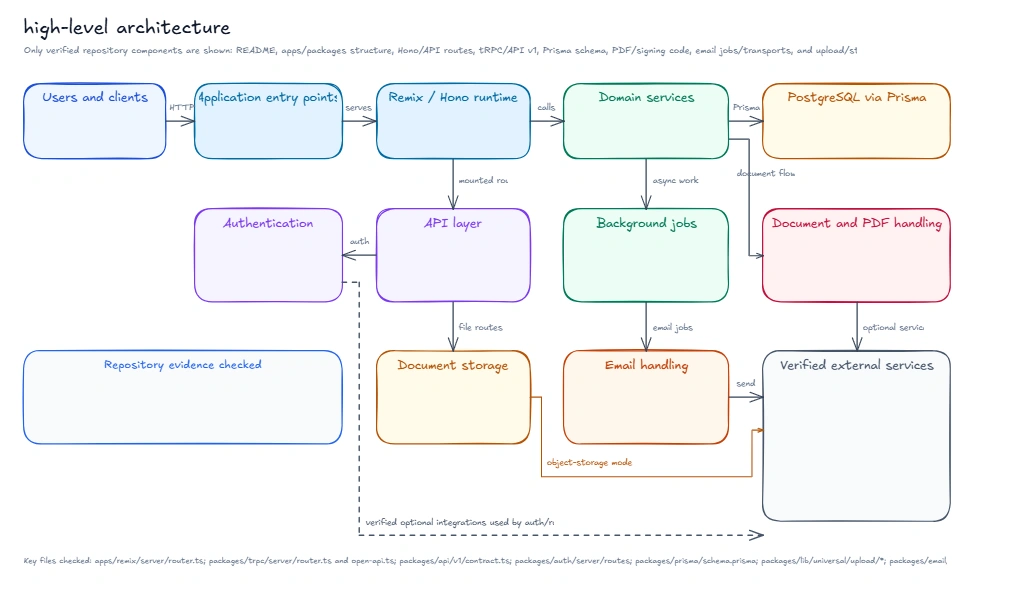
Diagram file:
Reference PR:
https://github.com/codewalnut-labs/documenso/pull/4
Diagram Type 2: Flow Diagram
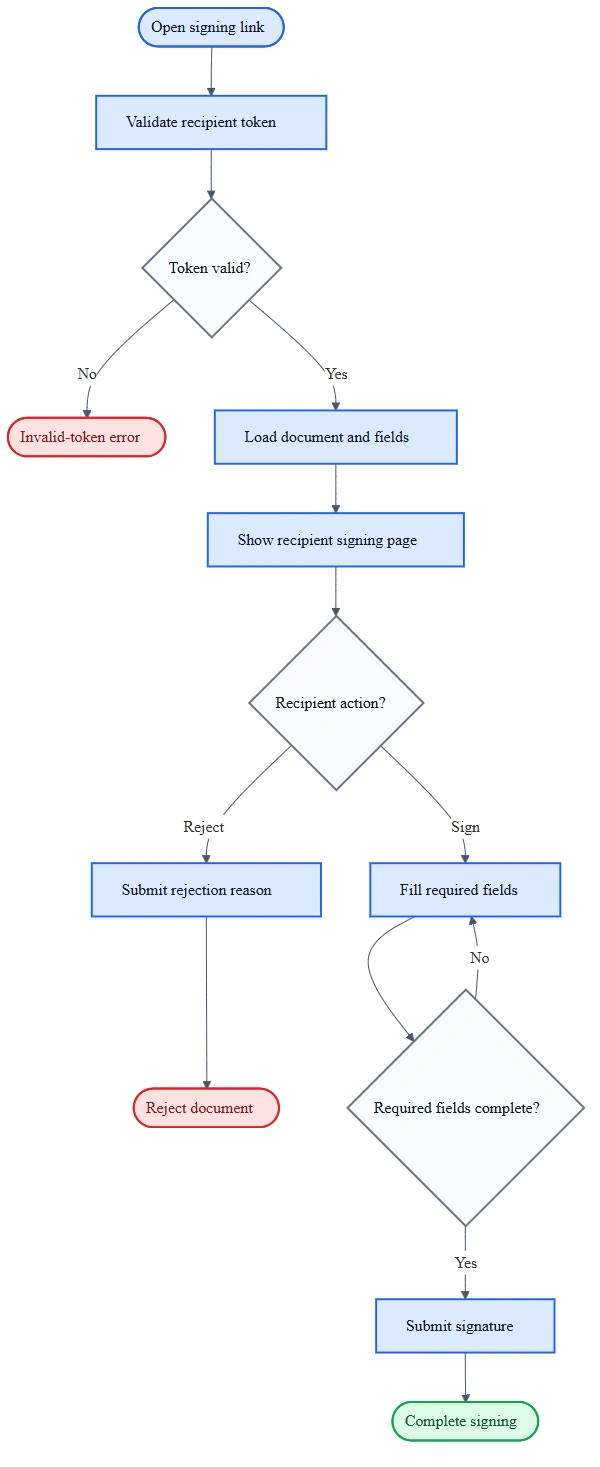
Flow diagrams help explain a user journey or process.
Keep the flow diagram focused on one path. Do not include every edge case in the product.
For this example, use the recipient signing flow.
Prompt
Steps
- Run the prompt in the repository.
- Open docs/recipient-signing-flow.mmd.
- Review the diagram.
Flow Diagram
Open PR source file:
Open PR diagram image:
Reference PR:
https://github.com/codewalnut-labs/documenso/pull/10
Diagram Type 3: Sequence Diagram
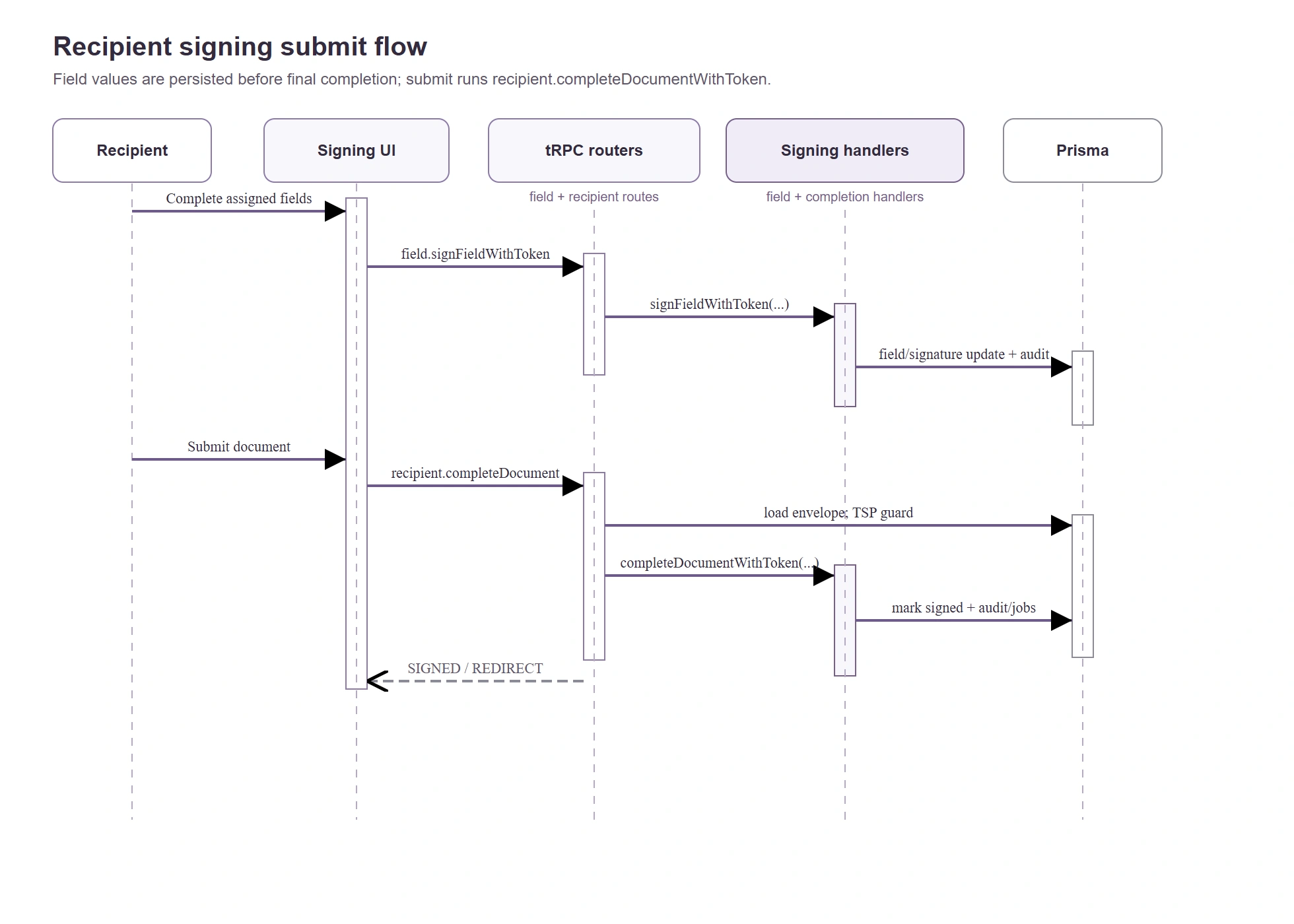
Sequence diagrams help explain how different parts of a system communicate over time.
Keep the sequence diagram medium-sized. A sequence diagram becomes hard to read when it has too many actors.
For this example, use the recipient signing submit flow.
Prompt
Steps
- Run the prompt in the repository.
- Open docs/recipient-signing-sequence.drawio.
- Verify the order of calls.
Sequence Diagram
Open PR source file:
Open PR diagram image:
Reference PR:
https://github.com/codewalnut-labs/documenso/pull/11
Diagram Type 4: ER Diagram
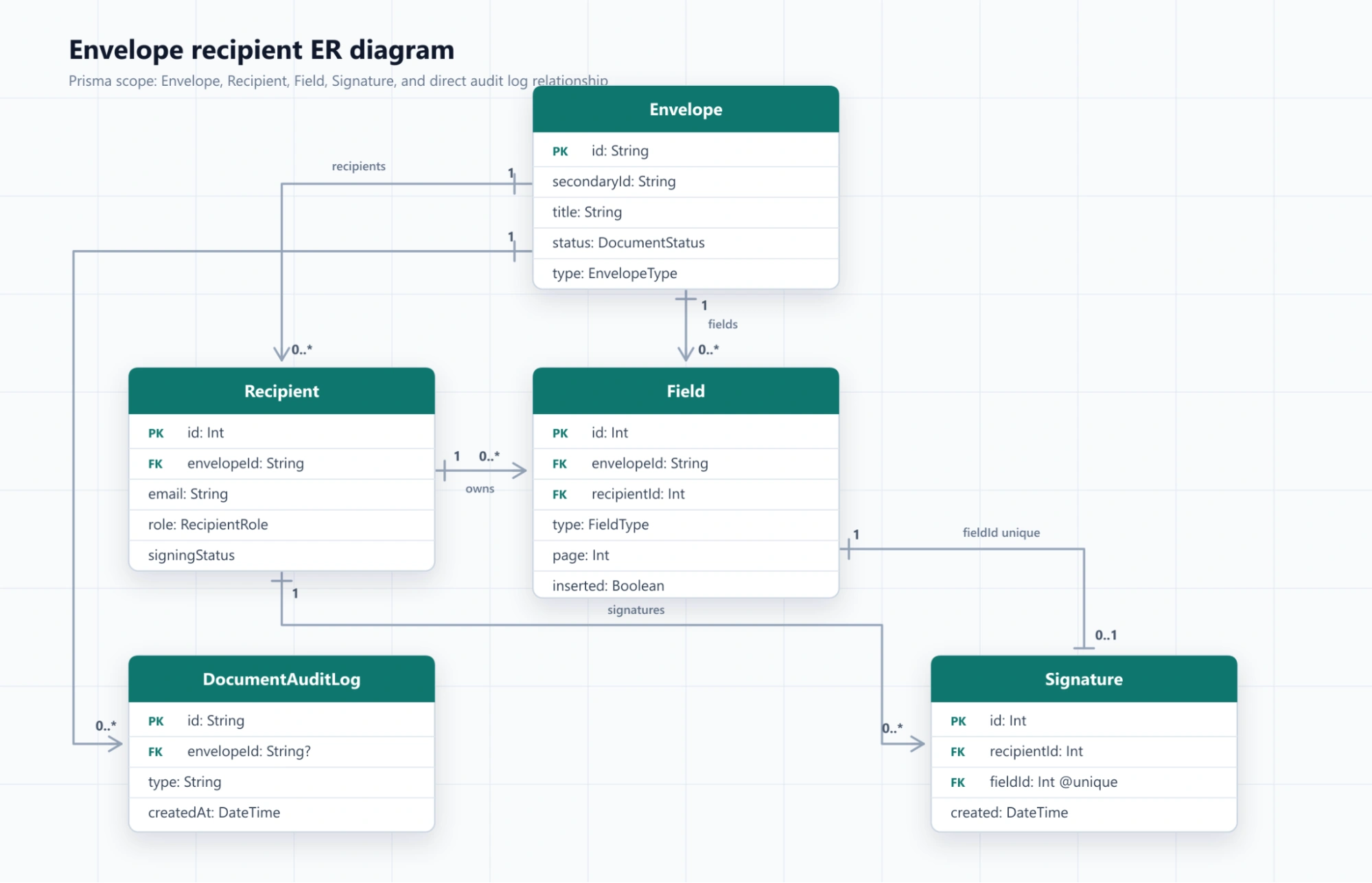
ER diagrams help explain database entities and relationships.
Do not include every model from a large schema. Pick a focused data slice.
For this example, use the document signing data model.
Prompt
Steps
- Run the prompt in the repository.
- Open docs/envelope-recipient-er.png.
- Verify every model and relationship.
ER Diagram
Open PR source file:
Open PR diagram image:
Reference PR:
https://github.com/codewalnut-labs/documenso/pull/12
Which Diagram Should You Use?
Updating an Existing Diagram
You can also ask the agent to update an existing diagram when the code changes.
Prompt
Get in touch - Our team has developed scalable solutions for enterprises and has a Crunch rating of 4.9⭐.



Experience coding prowess firsthand. Choose CodeWalnut to build a prototype within a week and make your choice with confidence.

Accelerate your web app vision with CodeWalnut. In just a week, we'll shape your idea into a polished prototype, powered by Vercel. Ready to make it real? Choose us with confidence!

Dreaming of a powerful web app on Heroku? Let CodeWalnut bring it to life in just one week. Take the leap and trust us to deliver with confidence!

Related topic
React Coding Masterclass — Foundations Edition
Learn React best practices used by senior engineers. This React Coding Masterclass covers semantic HTML, naming conventions, declarative programming, architecture patterns, and SOLID principles for building clean, scalable React applications.
.webp)
Best 5 AI Code Review Tools: Complete Comparison with Real Data
A comprehensive, evidence-based comparison of the top 5 AI code review tools in 2025 - analyzing pricing, security compliance, user reviews, case studies with hard ROI numbers, and integration ecosystems to help engineering teams choose the right tool for their specific needs.

How I Executed a Successful React Hiring Walk-in Campaign: From Zero to Three Hires in One Day
From zero to three hires in one day—here’s how a small brand cracked ‘walk-in hiring’ in a new city, won trust, and turned interviews into developer fan moments.


 When to Hire CodeWalnut?


